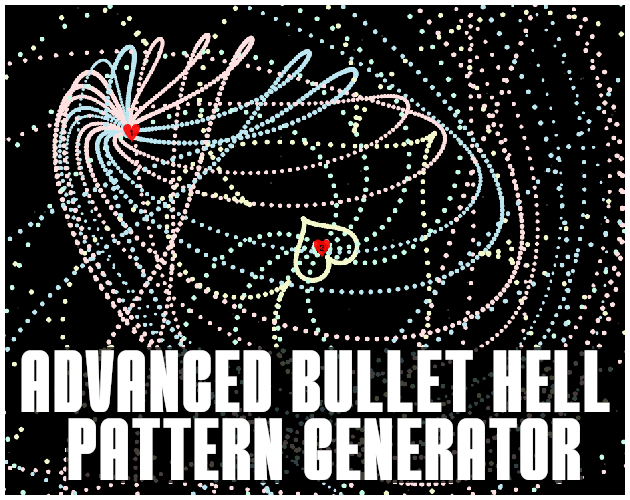
Advanced Bullet Hell Pattern Generator
Advanced Bullet Hell Pattern Generator (Work in Progress)
Based on: reiwukleiwu.github.io/Bullet-Hell-Pattern-Generator
Extended and improved by: deeconstruct, using generative AI to design and refine the code and feature set.
AI disclosure: The underlying code and many design decisions in this project were created and iteratively refined with the help of generative AI tools.
The Advanced Bullet Hell Pattern Generator is a browser-based tool for designing and experimenting with complex danmaku / bullet-hell patterns. It started as a fork and expansion of the original Bullet Hell Pattern Generator by reiwukleiwu, and has been significantly extended with multiple spawn points, automation, secondary burst patterns, and a built-in shape editor for custom bullet formations.
This project is very much a work in progress. Features may change, break, or get replaced as it evolves into a fully fledged pattern-design and playtesting suite.
What This Tool Does
This app lets you create complex bullet patterns for shmup / danmaku games without writing code. You can:
- Configure up to 6 independent spawn points.
- Control how many bullet arrays, bullet counts, spreads, spin behavior, speeds, and sizes each spawn uses.
- Automate spawn positions and parameters over time for moving bosses or intricate pattern choreography.
- Use built-in secondary burst patterns like hearts, stars, circles, and custom shapes.
- Draw your own burst shape in a vector-style editor and use it as a secondary pattern.
- Save and load your entire configuration to a JSON file so you can continue iterating later.
The goal is to give creators a playground where they can quickly explore ideas, tune difficulty, and prototype bullet patterns for future integration into actual games.
Core Features
Six Independent Spawn Points
Each spawn point has its own full set of controls and can be enabled or disabled individually. For every spawn you can:
- Spawn Position: Set the X/Y location inside the playfield.
- Bullets per Array: How many bullets are fired in each “fan” or ring.
- Total Bullet Arrays: How many arrays are fired per shot cycle.
- Individual Array Spread: Angular spread between bullets in a single array.
- Total Array Spread: Angular spread for how arrays are distributed around the spawn.
- Array Distance: Offset arrays away from the spawn point to create rings or layered patterns.
- Spin Speed & Acceleration: Control how the pattern rotates between spawns, with acceleration for forward and reverse spin.
- Fire Rate: Arrays-per-second, allowing very dense or sparse patterns.
- Bullet Speed & Size: Tune projectile behavior and hitbox readability.
Per-Array Colors, Sizes, and Speeds
For more advanced designs, each spawn point supports:
- Array Colors: Choose a separate color for each bullet array (e.g., alternating colors in a spiral).
- Per-array Bullet Sizes (optional): Enable this and set a specific size for each array.
- Per-array Bullet Speeds (optional): Enable this and assign different speeds to each array for layered motion.
Enemy Marker & Playfield
Each spawn point has a simple “enemy marker” that shows where bullets originate. You can configure:
- Enemy style (e.g., simple shapes like squares or hearts)
- Color, size, and transparency
- Identifier display (numbers) to keep track of which spawn point is which
The playfield is configurable:
- Playfield Width & Height: Adjust to match your target game resolution or aspect ratio.
- Background Color & Margin Color: Customize the look and framing.
- Scrolling Stars: Optional vertical or horizontal starfield for a shmup-style backdrop.
Automation & Motion
Automating Spawn Position (X/Y)
You can animate the spawn’s X and/or Y position over time using built-in automation:
- Each axis has Min, Max, and Speed controls.
- Automation uses a smooth sine-wave motion between Min and Max.
- The system tries to honor the spawn’s current slider value when you turn automation on, so motion feels like it continues from your chosen start point.
The Reset button restores all spawns to their saved “initial” positions while keeping your automation ranges and other settings intact. This lets you test patterns from a clean starting layout after tweaking values.
Spin Logic & Real-Time Delta
Rotation is based on actual delta time (dt), not a fixed 60 FPS assumption. That makes spin behavior more stable across machines
with different performance profiles.
Secondary Pattern Fire (Burst Shapes)
Each spawn can optionally use a secondary “burst” pattern. These are special shapes that fire as a radial burst:
- Secondary Fire Rate: How often the shape is spawned.
- Secondary Bullet Speed & Size: Controls for the burst bullets.
- Pattern Density: Changes how many bullets are used to form the shape (lower density = more readable patterns, higher density = “curtain of bullets”).
- Pattern Color: Separate color for the secondary bullets.
- Shape Selection: Circle, heart, star, and a custom shape slot.
- Orientation: Initial angle control so you can rotate the shape (e.g. heart pointing up/down/left/right).
- Rotation Mode:
- Burst Rotation: Each burst is fired at a slightly rotated angle over time, creating spiraling patterns.
- Shape Twirl: The entire shape (heart/star/circle/custom) spins as a whole while expanding outward, like a rotating wheel of bullets.
You can also choose whether the secondary pattern adds to or replaces the primary fire, giving you a lot of control over how dense and chaotic your final pattern becomes.
Presets
To make it easier to get started, a selection of predefined patterns is available per spawn:
- Classic radial “flower” spreads
- Rotating rings of bullets
- Basic danmaku patterns inspired by common shmup bullet archetypes
You can select a preset from the dropdown under each spawn to instantly configure its parameters, then tweak from there.
Custom Shape Editor (Vector-Style)
The tool includes an experimental shape editor that lets you design your own burst outline:
- Open the custom shape editor and draw using a grid-based canvas.
- Place control points on the grid; segments are interpolated to form smooth curves between points.
- Insert new points along existing segments by clicking near the line (the tool figures out which segment is closest).
- An undo function lets you remove the last action if you make a mistake.
- The center of the grid is highlighted so you can design symmetrical shapes around the origin.
Once you’re happy with the shape, you can apply it to one of the custom burst slots and use it as a secondary pattern just like the built-in circle, heart, or star.
Saving & Loading
The app has a simple Save and Load system using JSON files:
- Save: Exports almost all current settings (spawn parameters, colors, automation ranges, secondary fire settings, etc.) into a JSON file.
- Load: Restores the playfield size, spawn setups, enemy markers, and pattern behavior so you can pick up where you left off.
This allows you to build a library of different patterns and boss phases and revisit them later, or share patterns with other people using the tool.
How to Use (Quick Start)
- Open the HTML file in your browser (no install required).
- Use the Play Field Width/Height sliders to set your working area.
- Expand Spawn Point 1 Settings, make sure it’s enabled, and adjust:
- Bullets per Array, Total Bullet Arrays, and the spread sliders to get a basic pattern.
- Fire Rate, Bullet Speed, and Bullet Size to control density, difficulty, and visuals.
- Optionally enable Secondary Pattern Fire for that spawn:
- Choose a shape (circle, heart, star, or custom).
- Adjust Pattern Density, Secondary Fire Rate, and Shape Spin.
- Try both Burst Rotation and Shape Twirl modes and see which aesthetic you like.
- Use the Reset button any time you want to snap all spawn positions back to their initial coordinates without losing your settings.
- When you have something you like, click Save to export it, or Load to bring back a previous setup.
Planned / Future Features
This tool is actively evolving. Some planned or desired future features include:
- Playable Pattern Test Mode: A separate “player” app that loads your saved pattern file and lets you fly a hitbox/ship through the bullets to play-test difficulty in real time.
- User Preset Library: The ability to save your own pattern presets directly in the UI and quickly recall them per spawn.
- More Shape Tools: Better handles for bezier-like control, corner/smooth point modes, and refined snapping for the shape editor.
- Preset Sharing: Possibly a lightweight import/export format for sharing patterns easily with other users.
- UI/UX Polish: Skins, better labeling, keyboard shortcuts, and quality-of-life tweaks for long pattern design sessions.
- More Secondary Shapes: Additional built-in motifs (flowers, spirals, glyphs, etc.) tailored for common danmaku visual languages.
Credits
- Original Concept & Base Tool: reiwukleiwu
- Extended Design & Direction: deeconstruct
- Code Generation & Iterative Refinement: Generative AI assistance
If you encounter bugs, strange behavior, or have ideas for new features, please consider leaving feedback. This is an experimental tool, and
your use-cases and suggestions will help decide where it goes next. NOTE: SAVE FEATURE IS NOT IMPLEMENTED! APP HAS BEEN UPDATED MANY TIMES SINCE SAVE WAS IMPLEMENTED AND NO LONGER FUNCTIONS CORRECTLY... but have fun messing around. There are probably a plethora of small bugs you will find if you go crazy.. so please let me know in the comments!
This projects been ongoing for a long time and I only come back to it out of boredom so don't expect super timely updates!
Leave a comment
Log in with itch.io to leave a comment.